Exporting and Importing Presentations
Once you have created presentations in EasyWorship, you have the option to export it to a file and then import it on a different computer. This can be done as a way to backup your presentation files or to just transfer it for use on another computer.
Exporting Presentations
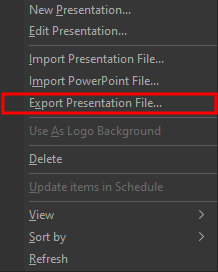
- Right click the presentation you want to export, or select the presentation you want to export and click the gear icon
 at the bottom of the Presentations Library.
 - On the menu that opens, select Export Presentation File....
- In the Browse For Folder window that opens, select the location you want to export the presentation to.
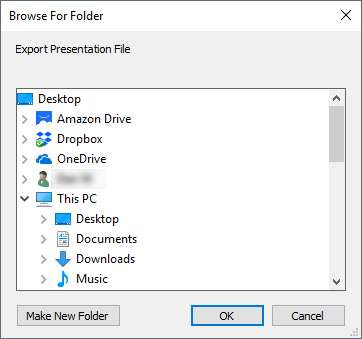
- Click OK
- Your presentation will be saved to your selected location with the same name as the presentation name. For example, if you have a presentation named Announcements, it will be saved as Announcements.ewpx.
NOTE If you select to export a PowerPoint file, it will save the presentation in your selected location in a PowerPoint format.
Importing Presentations
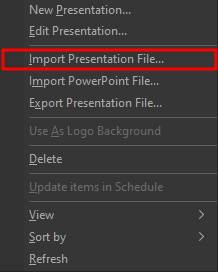
- Right click anywhere in the Presentations Library or click the gear icon at the bottom.
- On the menu that opens, select Import Presentation File....
- In the Import Presentation Resource Item window that opens, browse to the location of the presentation you want to import.
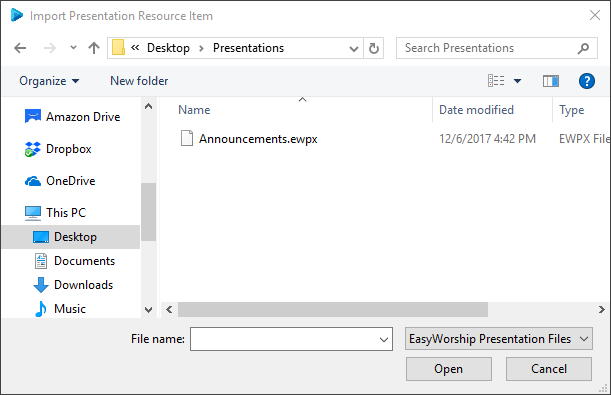
- Select the presentation and click Open.
- The presentation will be added to your Presentations Library.
Importing PowerPoint Presentations
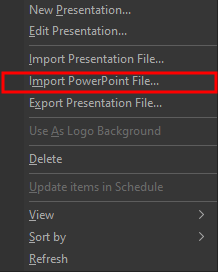
- Right click anywhere in the Presentations Library or click the gear icon at the bottom.
- On the menu that opens, select Import PowerPoint File....
- In the Import PowerPoint Resource Item window that opens, browse to the location of the presentation you want to import.
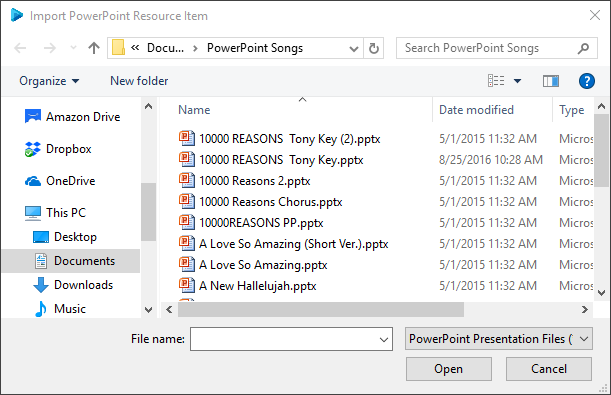
- Select the presentation and click Open.
- The PowerPoint will be added to your Presentations Library.
SEE So Long PowerPoint video for more information on creating EasyWorship presentations instead of importing PowerPoint presentations.