Searching Scriptures
SEE Video tutorial on How to Search Scriptures
Quick Search
- For a reference search such as 1 Thessalonians 1:3:
- In the search box, type "1 The". EasyWorship will then auto-complete the book name for you as 1 Thessalonians.
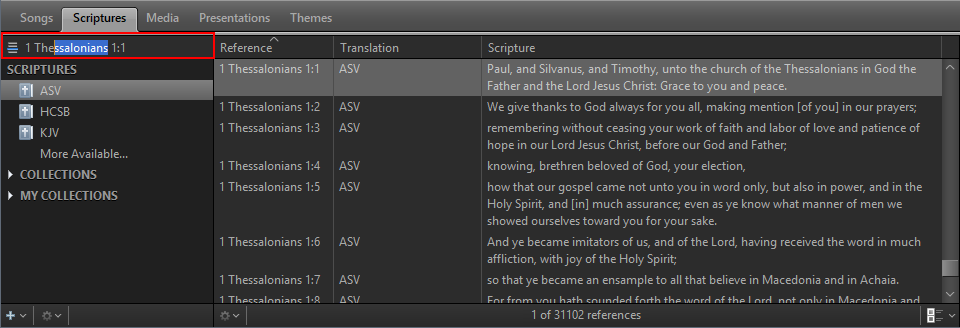
- Press the Spacebar, then type in the chapter, 1.
- Press the Spacebar, then type in the verse, 3.
NOTE If you want to search for a block of scriptures, as in 1 Thessalonians 1:1-10, follow the same instructions, but on step 3 press the spacebar again and add the ending verse number.
Contextual Search
- For a contextual search, like the word "hope":
- To search the Scriptures by keyword, click the Search icon above the bible list. When it looks like a magnifying glass
 , it's set to contextual search (i.e., keyword).
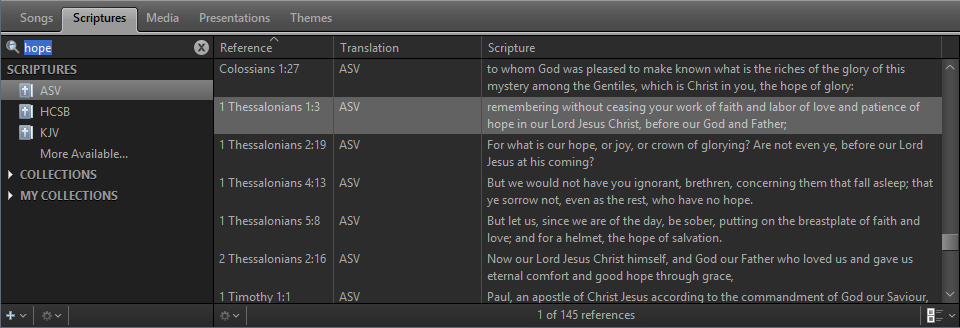
- Type in the word hope.
- Every verse in the bible with the word "hope" will be listed.
NOTE You can also search multiple keywords by typing them in with spaces (i.e., hope love God) and it will search for verses with all of those words in it.
NOTE If you want to search a phrase, type your phrase in quotes (i.e., "God is love") and it will search for verses with that whole phrase.