Installing Additional Translations
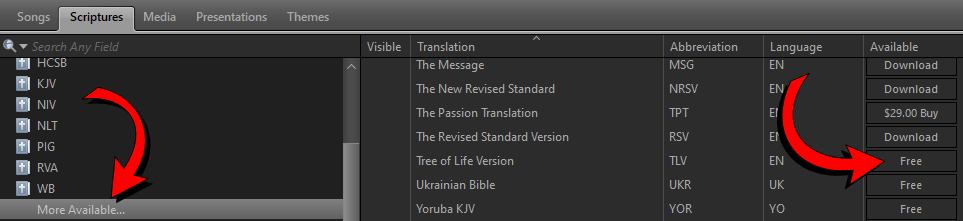
Installing Free Bible Translations
- Click the Scriptures tab in the Resource Area.
- Select More Available from the Resource Library on the left.
- Find any Bible you want to install with a Free button next to it.
- Click the Free button to install that Bible Translation.
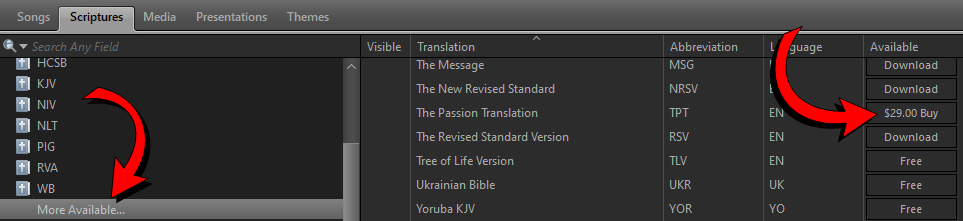
Purchasing Bible Translations
- Click the Scriptures tab in the Resource Area.
- Select More Available from the Resource Library on the left.
- Find any Bible you want to install with a Buy button next to it.
- Click the Buy button and enter in your account's email and password and enter in payment information to purchase.
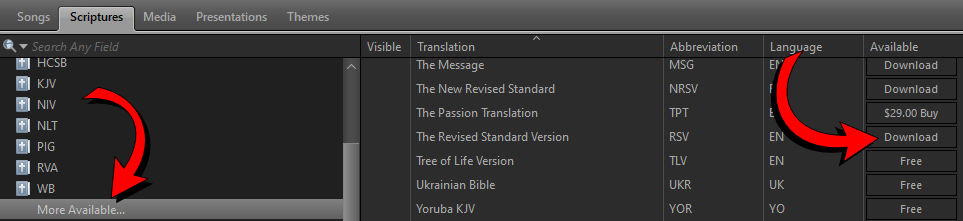
Downloading Purchased Bible Translations
- Click the Scriptures tab in the Resource Area.
- Select More Available from the Resource Library on the left.
- Find any Bible you want to install with a Download button next to it.
- Click the Download button to install that Bible Translation.
Updating Bible Translations
- Click the Scriptures tab in the Resource Area.
- Select More Available from the Resource Library on the left.
- Find any Bible that has an Update button next to it.
- Click the Update button to update that Bible Translation.
NOTE Updates will have bug fixes or text fixes in them. This will ensure you have the latest and most accurate version.
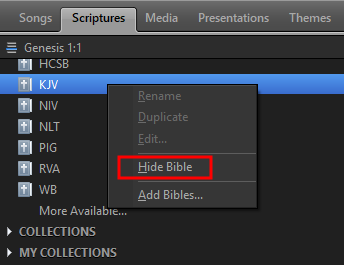
Hiding Installed Bible Translations
- Click the Scriptures tab in the Resource Area.
- Right-click the translation you want to hide from the Resource Library on the left.
- Select Hide Bible from the right-click menu.