PowerPoint Integration
Importing a PowerPoint Presentation into EasyWorship
There are two ways to import a PowerPoint presentation into EasyWorship - directly into the Schedule or within the Presentations tab.
Adding a Presentation to the Schedule
- Click the Settings
 icon in the Schedule Area. Select Add Item... > Browse for PowerPoint file....
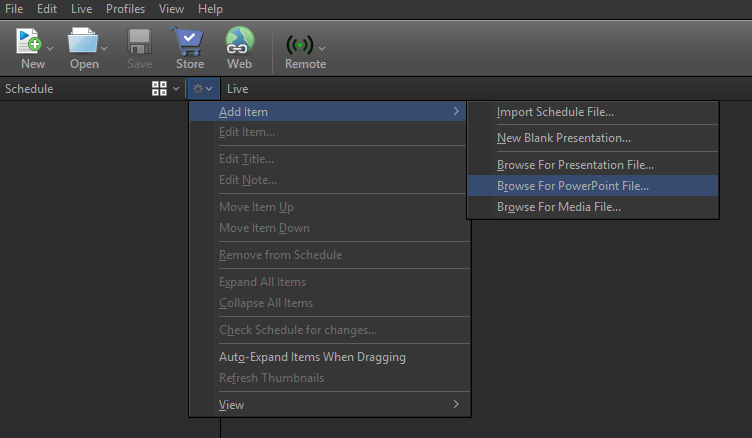
- Navigate to and select the desired PowerPoint presentation and click Open.
Adding a Presentation to the Presentations Tab
- Click the Presentations tab in the Resource Area.

- Click the Settings icon and select Import PowerPoint file.... OR right-click anywhere in the Presentations Area and select Import PowerPoint file....
- Navigate to and select the desired PowerPoint presentation and click Open.
- If you want to edit that file, right-click the file in the Presentations Area and select Edit Presentation.... EasyWorship will open the PowerPoint application for you to make your edits. When finished making edits, save the PowerPoint file and close the PowerPoint application and the presentation will be updated in the Presentations Area in EasyWorship.
- To add the presentation to the Schedule, drag-and-drop it from the Presentations Area to the Schedule Area.
Jumping In and Out of a PowerPoint Presentation
EasyWorship gives you the option to use a PowerPoint presentation, but if you want to use a scripture verse from EasyWorship, you have to get out of the PowerPoint presentation to go to a scripture. EasyWorship gives you a Go Back  button to return to the slide you were on if you use the scriptures while live to a PowerPoint presentation.
- While displaying an imported PowerPoint presentation in EasyWorship, click the Scriptures tab in the Resource Area or select your scripture in the schedule.
- Select the desired scripture and press Enter or click Go Live. The scripture is immediately projected to the live output. A Go Back button appears at the top of the Live pane.

- Click Go Back. The PowerPoint presentation displays to the live output at the same place you exited to project the scripture.