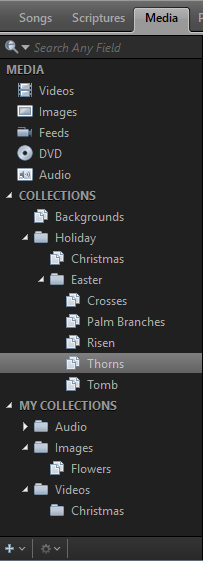
Collections
Collections in EasyWorship help you organize your resources to make them easier to find and access. You can create Collections in any of your resource tabs: Songs, Scripture, Media Presentations, or Themes.
There are two different types of Collections: Collections and My Collections.

Collections
These are viewable to any windows user that's logged into the computer or network that is using that EasyWorship database. If you ever backup your database, Collections will be backed up with it.
My Collections
These are private collections only viewable to the windows user that is logged in on that computer when the My Collection is created. Any other windows user or network user accessing that EasyWorship database will not be able to see it. If you ever backup your database, My Collections will not be backed up with it.
Folders
Within Collections and My Collections you can create Folders which are just containers for your collections. For example:
If you want to create a collection in your Media but you want to keep your images and videos separate, you can create a Folder called Images and a Folder called Videos. Under each of those folders, you can create other folders and collections. So, under the images folder, create a folder called Easter, then create collections under that folder called Crosses, Palm Branches, Tomb, Risen... You will then add your images to those collections.
NOTE You don't have to create folders to create collections, but you do have to have a collection to add resources to it. You cannot add resources to a folder.
NOTE If you have a folder with different collections, selecting the folder will show all resources in all collections under that folder.