Main Song
To access the Options menu in EasyWorship, click Edit > Options.... In the bottom left corner of the Options window, there is a check-box next to Preview Output. Use this option to view changes on the output screen as you make them.
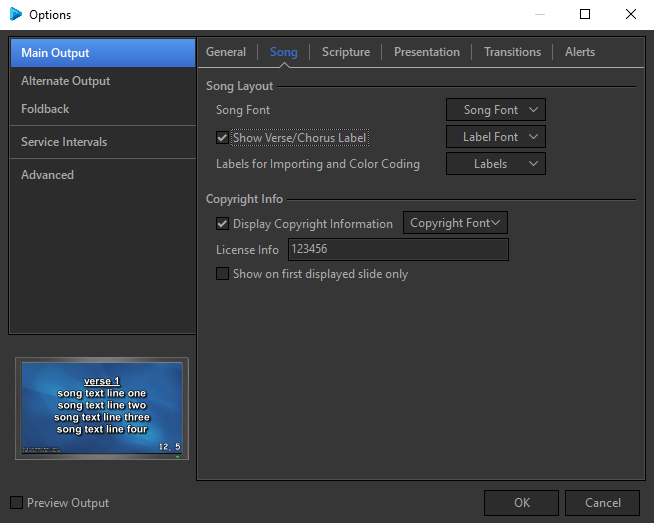
Song Layout
|
Song Font |
Refer to Default Font for information on the options in this window. |
|
Show Verse/Chorus Label |
Checking this box tells EasyWorship to display labels that have been entered into your song, e.g., Verse, Chorus, Bridge, etc. |
|
Label Font |
Refer to Default Font for information on the options in the Label Font window. |
|
Labels for Importing and Color Coding |
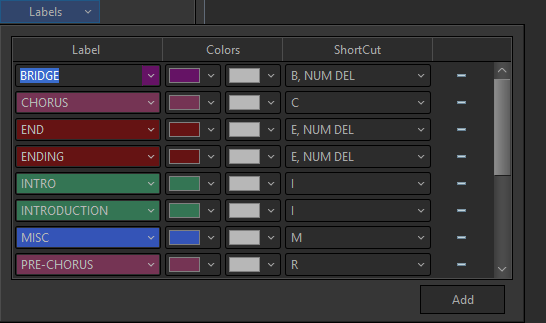
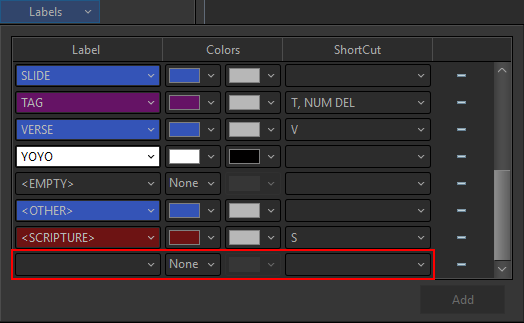
This option allows you to set the color coding of your choice for labels and set custom shortcut keys for each type of label. |
|
Labels |
You can add new labels if the desired label does not exist.
|
Copyright Info
|
Display Copyright Information |
Checking this box tells EasyWorship to display Copyright info on song slides when displaying to the audience. |
|
Copyright Font |
Refer to Default Font for information on the options in the Copyright Font window. |
|
License Info |
The License Info field allows you to enter your CCLI or other copyright license number to be displayed on songs that require copyright information to be displayed. |
|
Show on first displayed slide only |
When checked, displays the copyright info on the first displayed slide only. |