Importing Bible Plug-in Into EasyWorship
- On the computer with no internet connection, insert the flash drive from Download Offline file & Bible file.
- Open EasyWorship and select the Scriptures tab.
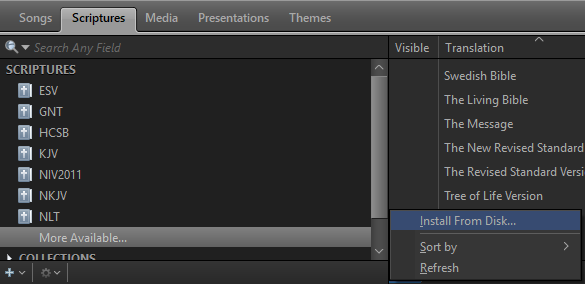
- Click More Available... at the bottom of the list of bibles.
- Click the gear icon at the bottom of the list of available bibles in the middle column.
- Click Install From Disk...
- Browse to the flash drive and select the bible file(s) you wish to install.
- Click Open.
- Click Help > Register Products....
- Click Add bibles or change registration using a license file.
- Browse to the flash drive and select the EasyWorship License.ewl file.
- Click Open and log in.
- The bible should now be available in EasyWorship.
NOTE You may find it easier to take the computer to a location that has internet access or use your phone as a Wifi hotspot long enough to install the bible via the internet.